¶ Trino 인증
¶ 지원하는 인증 방식
config.properties 의 http-server.authentication.type 으로 고른다[1].
| 값 | 방식 |
|---|---|
PASSWORD |
패스워드 파일 · LDAP · Salesforce. 어느 것인지는 password-authenticator.properties 에서 정한다 |
OAUTH2 |
OAuth 2.0 / OIDC |
KERBEROS |
Kerberos |
CERTIFICATE |
클라이언트 인증서 |
JWT |
JWT 토큰 |
HEADER |
HTTP 헤더 |
쉼표로 여러 개를 두면 앞에서부터 차례로 시도한다.
http-server.authentication.type=PASSWORD
# 또는
http-server.authentication.type=PASSWORD,CERTIFICATE
인증을 켜기 전에 TLS 와 shared secret 이 있어야 한다. Trino 설정 의 TLS · 내부 통신 절을 먼저 한다.
¶ 패스워드 파일
가장 단순한 방식이다[2]. Coordinator 에만 설정한다.
¶ password-authenticator.properties
password-authenticator.name=file
file.password-file=/opt/trino/etc/password.db
| 속성 | 뜻 |
|---|---|
file.password-file |
패스워드 파일 경로 |
file.refresh-period |
파일 다시 읽는 주기. 기본 5s |
file.auth-token-cache.max-size |
인증 결과 캐시 수. 기본 1000 |
¶ 계정 만들기
htpasswd 는 httpd-tools 패키지에 있다. bcrypt(-B) 는 cost 8 이상이어야 한다.
sudo dnf install -y httpd-tools
touch /opt/trino/etc/password.db
htpasswd -B -C 10 /opt/trino/etc/password.db haedong
파일은 사용자:해시 한 줄씩이다. 주기마다 다시 읽으므로 계정을 더해도 재시작하지 않아도 된다.
¶ 확인
trino --server https://trino.example.net:8443 --user haedong --password
SELECT 'rocks' AS trino;
¶ LDAP · Active Directory
LDAP 서버에 bind 해서 인증한다[3]. ldaps:// 를 쓰면 서버 인증서를 truststore 로 신뢰시켜야 하고, 평문 ldap:// 는 ldap.allow-insecure=true 를 넣어야 한다.
¶ password-authenticator.properties — Active Directory
password-authenticator.name=ldap
ldap.url=ldaps://ad.example.net:636
ldap.ssl.truststore.path=/etc/pki/java/cacerts
ldap.ssl.truststore.password=${TRUSTSTORE_PASSWORD}

# AD 는 UPN 으로 bind 한다
ldap.user-bind-pattern=${USER}@ad.example.net

# 특정 그룹만 허용할 때. 검색용 계정이 필요하다
ldap.user-base-dn=DC=ad,DC=example,DC=net
ldap.bind-dn=CN=trino_svc,OU=service,DC=ad,DC=example,DC=net
ldap.bind-password=${BIND_PASSWORD}
ldap.group-auth-pattern=(&(objectClass=person)(sAMAccountName=${USER})(memberof=CN=TrinoUsers,OU=groups,DC=ad,DC=example,DC=net))
¶ password-authenticator.properties — OpenLDAP
password-authenticator.name=ldap
ldap.url=ldaps://ldap.example.net:636
ldap.ssl.truststore.path=/etc/pki/java/cacerts
ldap.user-bind-pattern=uid=${USER},ou=people,dc=example,dc=net
여러 bind 패턴은 콜론으로 잇는다 — uid=${USER},ou=people,dc=a,dc=b:uid=${USER},ou=svc,dc=a,dc=b.
¶ JDBC 클라이언트
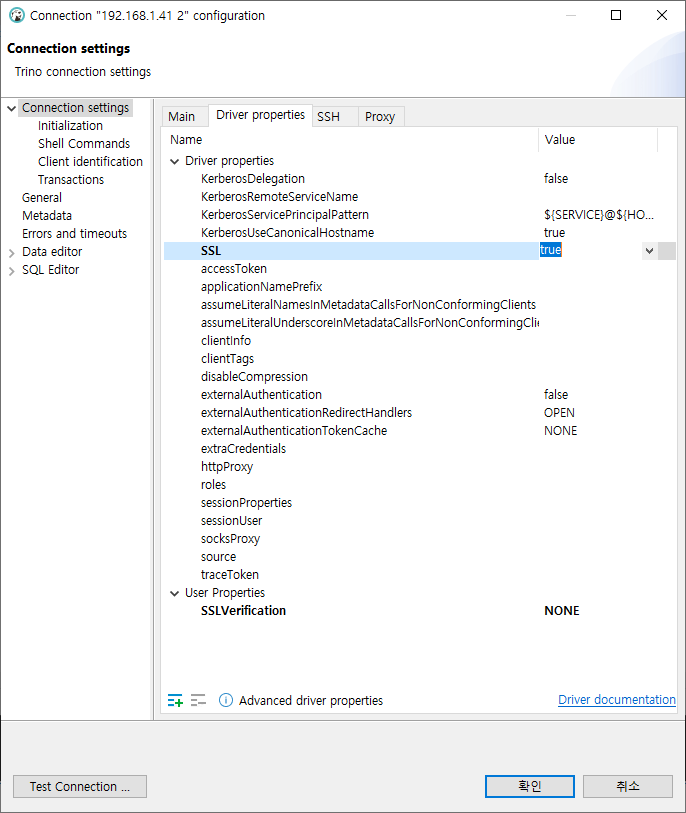
TLS 를 켠 coordinator 에 JDBC 로 붙을 때는 SSL=true 를 준다. 자체 서명 인증서면 CA 를 신뢰시키거나 검증을 끈다.
| 속성 | 값 |
|---|---|
SSL |
true |
SSLVerification |
FULL(기본) · CA · NONE |
SSLTrustStorePath |
CA 를 넣은 truststore 경로 |
jdbc:trino://trino.example.net:8443?SSL=true&SSLVerification=NONE
SSLVerification=NONE 은 시험용이다. 운영에서는 Trino 자체 서명 인증서 생성 의 Root CA 를 클라이언트 truststore 에 넣고 FULL 로 둔다.
Authentication types — 2026-09-20 확인. https://trino.io/docs/current/security/authentication-types.html ↩︎
Password file authentication — 2026-09-20 확인. https://trino.io/docs/current/security/password-file.html ↩︎
LDAP authentication — 2026-09-20 확인. https://trino.io/docs/current/security/ldap.html ↩︎