¶ JFrog Artifactory
¶ 개요
JFrog Artifactory 는 Maven · npm · PyPI · Docker 등 여러 패키지 형식을 한 곳에 담는 범용 아티팩트 저장소다. 원격 저장소 프록시(캐시) · 로컬 저장소 · 가상 저장소(여러 저장소를 하나의 URL 로 묶음)를 조합해 쓴다. 상용 Pro/Enterprise 와 무료 OSS(Community) 에디션이 있고, OSS 는 Maven · Gradle · Ivy · SBT · Generic 형식만 지원한다.
Self-managed 현행 릴리스는 7.161 계열이다.[1] Docker 이미지 저장소만 필요하면 Harbor 가 가볍고, Java · Python 패키지까지 무료로 쓰려면 Nexus Repository 를 함께 본다.
¶ 요구사항
- Java 는 배포 아카이브에 번들돼 있어 따로 설치하지 않는다 (
app/third-party/java). - 데이터베이스 — 기본은 내장 Derby 다. 운영 환경은 PostgreSQL 을 권장한다.
- 포트 — 8082 (라우터 · 웹 UI), 8081 (Artifactory 서비스).
- 전용 OS 계정
artifactory로 실행한다.
¶ 구성 요소
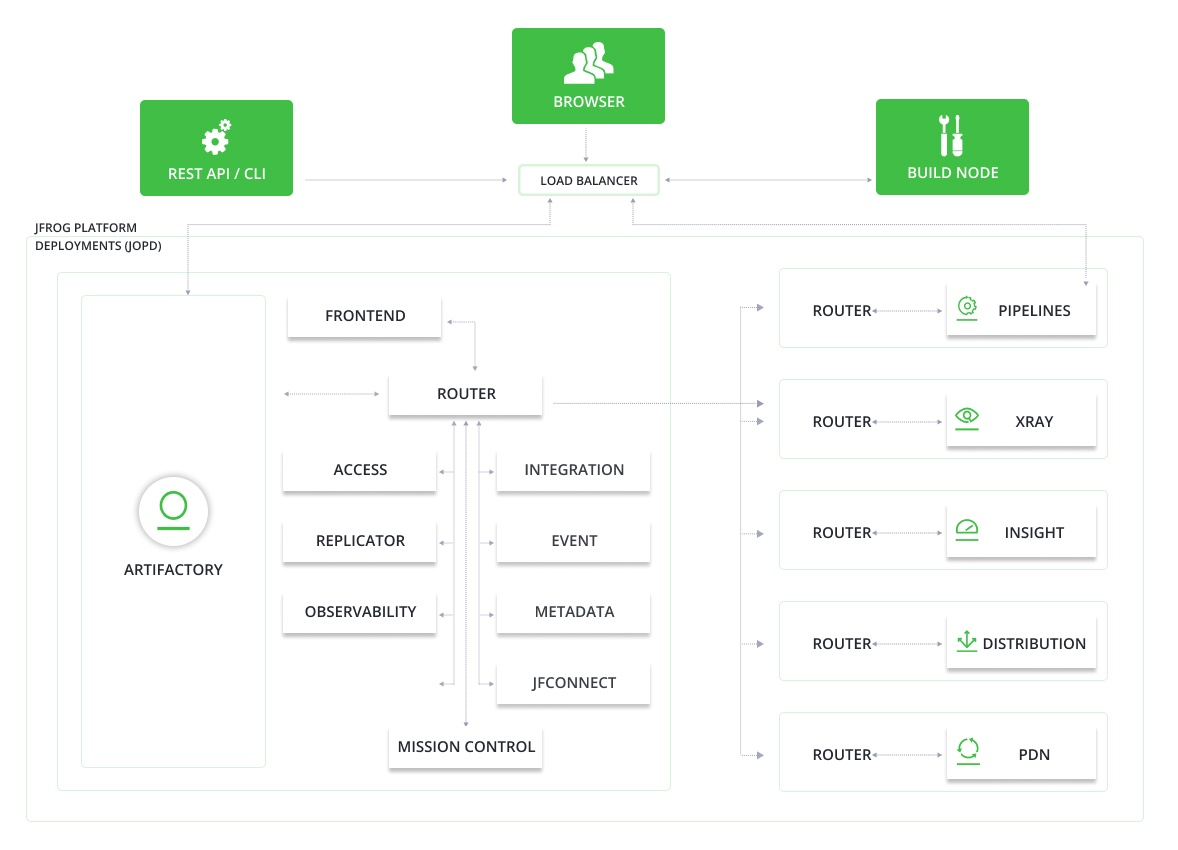
7.x 는 여러 마이크로서비스가 라우터 뒤에 묶여 있다 — Artifactory(저장소 본체), Access(인증 · 토큰), Router, Metadata, Frontend, Event 등. 설정은 $JFROG_HOME/artifactory/var/etc/system.yaml 한 파일로 모은다.
¶ 설치
¶ Artifactory OSS 7.77.7 Linux 아카이브 설치 (2024년 테스트 됨)
위 버전과 저장소는 오래된 것이라 저장소가 존재하지 않을 수 있다.
¶ 사전 패키지 설치
apt install socat esl-erlang rabbit-mq
¶ 바이너리 다운로드
https://jfrog.com/community/download-artifactory-oss/ 에서 Linux 아카이브를 받는다.
¶ Database 생성
PostgreSQL 에 전용 사용자와 DB 를 만든다.
CREATE USER artifactory WITH PASSWORD 'password';
CREATE DATABASE artifactory WITH OWNER=artifactory ENCODING='UTF8';
GRANT ALL PRIVILEGES ON DATABASE artifactory TO artifactory;
¶ 압축 해제 및 환경 변수 생성
tar -xvzf artifactory-oss-7.77.7.tar.gz
mkdir -p /opt/jfrog
mv artifactory-oss-7.77.7 /opt/jfrog
ln -s /opt/jfrog/artifactory-oss-7.77.7 /opt/jfrog/artifactory
echo 'export JFROG_HOME=/opt/jfrog' >> ~/.bashrc
echo 'export ARTIFACTORY_HOME=$JFROG_HOME/artifactory' >> ~/.bashrc
ln -s /opt/jfrog/artifactory/var/log /var/log/artifactory
chown -R artifactory:artifactory /opt/jfrog
ln -s /opt/jfrog/artifactory/var/etc/ /opt/jfrog/etc
¶ system.yaml 수정
$JFROG_HOME/artifactory/var/etc/system.yaml 에서 노드 IP 와 DB 연결을 적는다. 주석은 원본 파일 그대로다.
configVersion: 1

shared:
  ## Java 17 distribution to use
  #javaHome: "JFROG_HOME/artifactory/app/third-party/java"

  ## Extra Java options to pass to the JVM. These values add to or override the defaults.
  #extraJavaOpts: "-Xms512m -Xmx2g"

  security:
    ## Join key value for joining the cluster (takes precedence over 'joinKeyFile')
    #joinKey: "<Your joinKey>"
    #joinKeyFile: "<For example: JFROG_HOME/artifactory/var/etc/security/join.key>"
    #masterKeyFile: "<For example: JFROG_HOME/artifactory/var/etc/security/master.key>"
    #bootstrapKeysReadTimeoutSecs: 120

  node:
    ## A unique id to identify this node. Default auto generated at startup.
    #id: "art1"
    ## Default auto resolved by startup script
    ip: 192.168.218.181
    #primary: true
    #haEnabled: true

  database:
    ## One of mysql, oracle, mssql, postgresql, mariadb. Default Embedded derby
    type: postgresql
    driver: org.postgresql.Driver
    url: "jdbc:postgresql://192.168.218.181:5432/artifactory?useSSL=false"
    username: artifactory
    password: ${REDACTED}
¶ 서비스 등록과 동작 확인
아카이브에 들어 있는 스크립트로 systemd 서비스를 만든다.
sudo $JFROG_HOME/artifactory/app/bin/installService.sh
sudo systemctl enable --now artifactory
sudo systemctl status artifactory
방화벽에서 8082 를 열고 http://<host>:8082/ui/ 에 접속한다. 초기 계정은 admin / password 이며 첫 로그인 때 바꾼다.
sudo firewall-cmd --permanent --add-port=8082/tcp
sudo firewall-cmd --reload
¶ 트러블슈팅
¶ JFrog Artifactory 문제 해결
Self-managed 최신 7.161.29 — 2026-09-20 확인. https://docs.jfrog.com/releases/docs/artifactory-release-notes ↩︎