¶ Windows powershell 이용
¶ powershell[1] 실행
키보드의 [windows key] + r 을 입력한다.
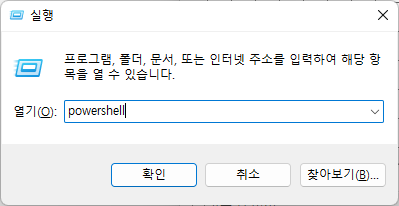 |
¶ 가상 머신 접속
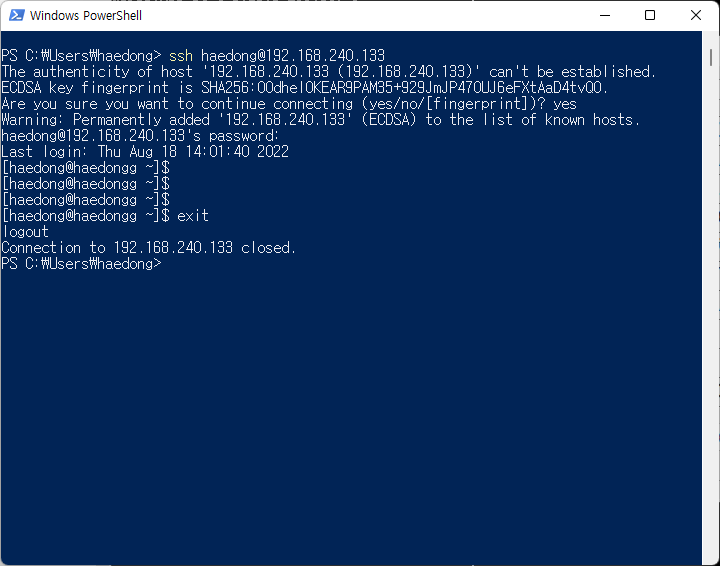
powershell에 다음과 같이 입력한다.
ssh haedong@192.168.240.133

# ssh 생성한_계정이름@가상머신_IP_주소
PS C:\Users\haedong> ssh haedong@192.168.240.133
The authenticity of host '192.168.240.133 (192.168.240.133)' can't be established.
ECDSA key fingerprint is SHA256:OOdheI0KEAR9PAM35+929JmJP470UJ6eFXtAaD4tvQ0.
Are you sure you want to continue connecting (yes/no/[fingerprint])? yes
Warning: Permanently added '192.168.240.133' (ECDSA) to the list of known hosts.
haedong@192.168.240.133's password:
${REDACTED} login: Thu Aug 18 14:01:40 2022
[haedong@haedongg ~]$
마지막줄이 powershell이 아닌 bash 형태로 변경되면 해당 서버에 접속 된 것이다.
¶ 접속 끊기
powershell을 종료하거나
exit를 입력한다.
[haedong@haedongg ~]$
[haedong@haedongg ~]$ exit
logout
Connection to 192.168.240.133 closed.
PS C:\Users\haedong>
 |
보통 windows 10 이상의 경우 기본적으로 powershell이 포함되지만 그렇지 않은 경우 따로 설치하거나
putty 등의 어플리케이션을 이용 해야 한다. ↩︎