¶ Keycloak v26.3.1 설치 가이드
¶ 개요
2025년 테스트 됨. Keycloak 26.3.1 을 /usr/lib/keycloak 에 풀고 PostgreSQL · PEM 인증서로 띄운 기록이다. 현행 절차는 Keycloak v26.7.4 설치 가이드 에 있다.
위 버전과 저장소는 오래된 것이라 저장소가 존재하지 않을 수 있다.
¶ 다운로드 및 설치
공식 홈페이지 에서 바이너리를 다운로드해 /usr/lib/keycloak 에 푼다.
¶ Java 정보 수정
$KEYCLOAK_HOME/bin/kc.sh 머리에 JAVA_HOME 을 넣었다.
#!/bin/bash

## 다음 줄 추가
export JAVA_HOME=/usr/lib/jvm/java-21-openjdk

case "$(uname)" in
    CYGWIN*)
        IS_CYGWIN="true"
        CFILE="$(cygpath "$0")"
        RESOLVED_NAME="$(readlink -f "$CFILE")"
        ;;
    Darwin*)
...후략
¶ 환경변수 추가
OpenLDAP 을 같은 서버에 소스 빌드로 두었기 때문에 두 제품의 경로를 함께 잡았다.
export HOME=/root
export OPENLDAP_HOME=/usr/local/openldap
export KEYCLOAK_HOME=/usr/lib/keycloak
export PATH=$OPENLDAP_HOME/bin:$OPENLDAP_HOME/sbin:$KEYCLOAK_HOME/bin:$PATH
export LD_LIBRARY_PATH=$OPENLDAP_HOME/lib:$KEYCLOAK_HOME/lib:$LD_LIBRARY_PATH
¶ 설정 변경
$KEYCLOAK_HOME/conf/keycloak.conf
# Database
db=postgres
db-username=keycloak
db-password=${REDACTED}

db-url=jdbc:postgresql://localhost/keycloak

# Observability
health-enabled=true
metrics-enabled=true

# HTTP
https-certificate-file=${kc.home.dir}/conf/certs/server_cert.pem
https-certificate-key-file=${kc.home.dir}/conf/certs/server_key.pem

# The proxy address forwarding mode if the server is behind a reverse proxy.
#proxy=reencrypt

# Do not attach route to cookies and rely on the session affinity capabilities from reverse proxy
#spi-sticky-session-encoder-infinispan-should-attach-route=false

# Hostname for the Keycloak server.
hostname=auth.haedongg.net
¶ 최초 시작
¶ kc.sh build
./kc.sh build
INFO: The following run time options were found, but will be ignored during build time: kc.db-url, kc.db-username, kc.db-password, kc.http-enabled, kc.http-port, kc.https-port, kc.https-certificate-file, kc.https-certificate-key-file, kc.hostname

Updating the configuration and installing your custom providers, if any. Please wait.
2025-07-18 16:31:41,789 INFO  [io.quarkus.deployment.QuarkusAugmentor] (main) Quarkus augmentation completed in 7579ms
Server configuration updated and persisted. Run the following command to review the configuration:

        kc.sh show-config
¶ kc.sh start
/usr/lib/keycloak/bin/kc.sh start --log="console,file" --log-console-color=true --log-console-level=info --log-file=/var/log/keycloak/keycloak.log
2025-07-18 16:37:10,579 INFO  [org.keycloak.quarkus.runtime.storage.database.liquibase.QuarkusJpaUpdaterProvider] (main) Initializing database schema. Using changelog META-INF/jpa-changelog-master.xml
2025-07-18 16:37:25,978 INFO  [org.keycloak.spi.infinispan.impl.embedded.JGroupsConfigurator] (main) JGroups JDBC_PING discovery enabled.
2025-07-18 16:37:26,828 INFO  [org.keycloak.spi.infinispan.impl.embedded.JGroupsConfigurator] (main) JGroups Encryption enabled (mTLS).
2025-07-18 16:37:27,040 INFO  [org.keycloak.jgroups.certificates.CertificateReloadManager] (main) Starting JGroups certificate reload manager
2025-07-18 16:37:27,396 INFO  [org.infinispan.CLUSTER] (main) ISPN000078: Starting JGroups channel `ISPN` with stack `jdbc-ping`
2025-07-18 16:37:27,417 INFO  [org.jgroups.protocols.pbcast.GMS] (main) auth-2527: no members discovered after 2 ms: creating cluster as coordinator
2025-07-18 16:37:27,498 INFO  [org.infinispan.CLUSTER] (main) ISPN000079: Channel `ISPN` local address is `auth-2527`, physical addresses are `[192.168.254.254:7800]`
2025-07-18 16:37:28,147 INFO  [org.keycloak.services] (main) KC-SERVICES0050: Initializing master realm
2025-07-18 16:37:30,501 INFO  [io.quarkus] (main) Keycloak 26.3.1 on JVM (powered by Quarkus 3.20.1) started in 25.824s. Listening on: http://0.0.0.0:8080 and https://0.0.0.0:8443. Management interface listening on https://0.0.0.0:9000.
2025-07-18 16:37:30,502 INFO  [io.quarkus] (main) Profile prod activated.
2025-07-18 16:37:30,502 INFO  [io.quarkus] (main) Installed features: [agroal, cdi, hibernate-orm, jdbc-postgresql, keycloak, micrometer, narayana-jta, opentelemetry, reactive-routes, rest, rest-jackson, smallrye-context-propagation, smallrye-health, vertx]
¶ 서비스 스크립트 생성
/etc/systemd/system/keycloak.service
[Unit]
Description=Keycloak Authentication server
After=network.target

[Service]
Type=simple
User=keycloak
Group=keycloak
Environment="JAVA_HOME=/usr/lib/jvm/java-21-openjdk"
ExecStart=/usr/lib/keycloak/bin/kc.sh start --optimized
Restart=on-failure
RestartSec=5

[Install]
WantedBy=multi-user.target
¶ 최초 로그인 (관리자 생성)
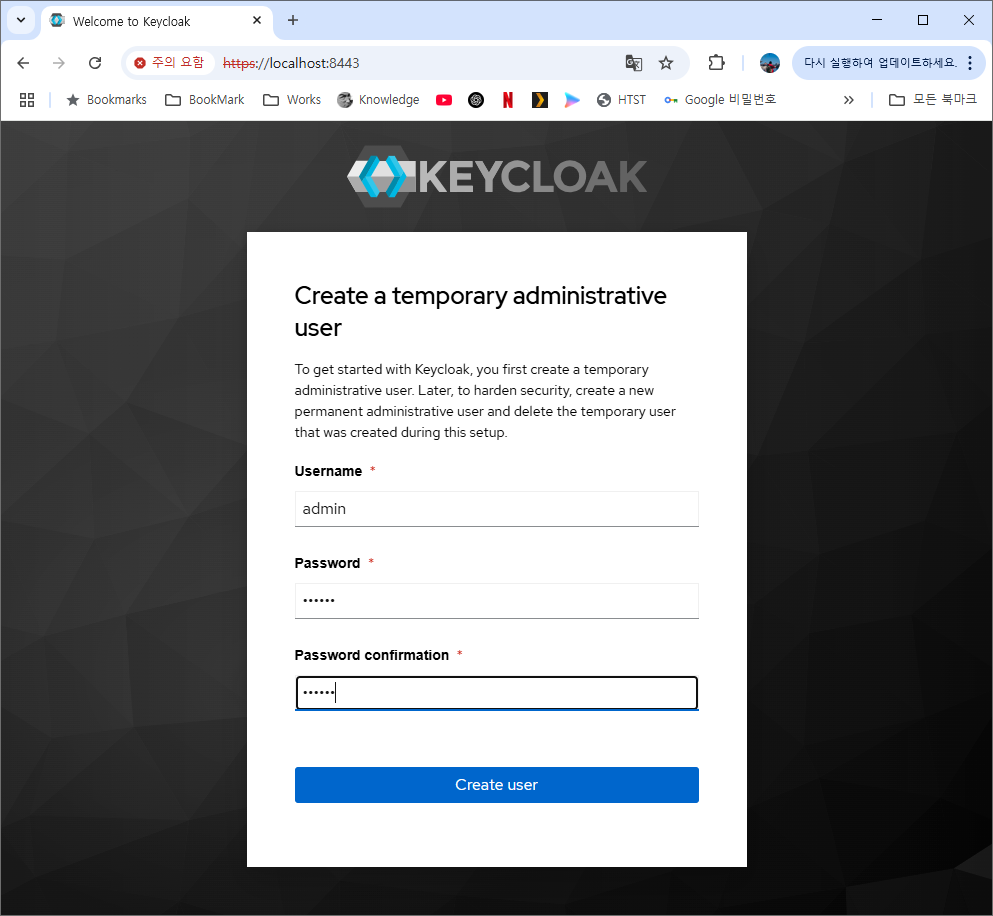
localhost 연결에서만 초기 관리자 생성 화면이 열리므로 SSH 터널 등을 이용한다. 현행 버전은 환경변수 KC_BOOTSTRAP_ADMIN_USERNAME · KC_BOOTSTRAP_ADMIN_PASSWORD 로 만든다.